
This latest HighGear release adds key capabilities like data retention, scheduled config syncs, and table field functionality. Each enhancement is designed to make your workflows more efficient, your data more actionable, and your daily experience in HighGear even smoother.
- SaaS customers will be upgraded to version 10.3 on the following dates:
- Early Access: 10 PM ET on Saturday, January 3rd
- Mainstream: 10 PM ET on Saturday, January 10th
- Self-hosted customers with an active maintenance agreement will be able to download the self-installing upgrade from the HighGear customer portal starting Monday, January 26th.
- For support, please contact Support@HighGear.com.
- For additional licenses or services, please contact Sales@HighGear.com.
New Features
Data Retention for Tasks
HighGear now offers configurable, process-level data retention to help organizations strengthen compliance, reduce unnecessary data storage, and maintain audit-ready governance.
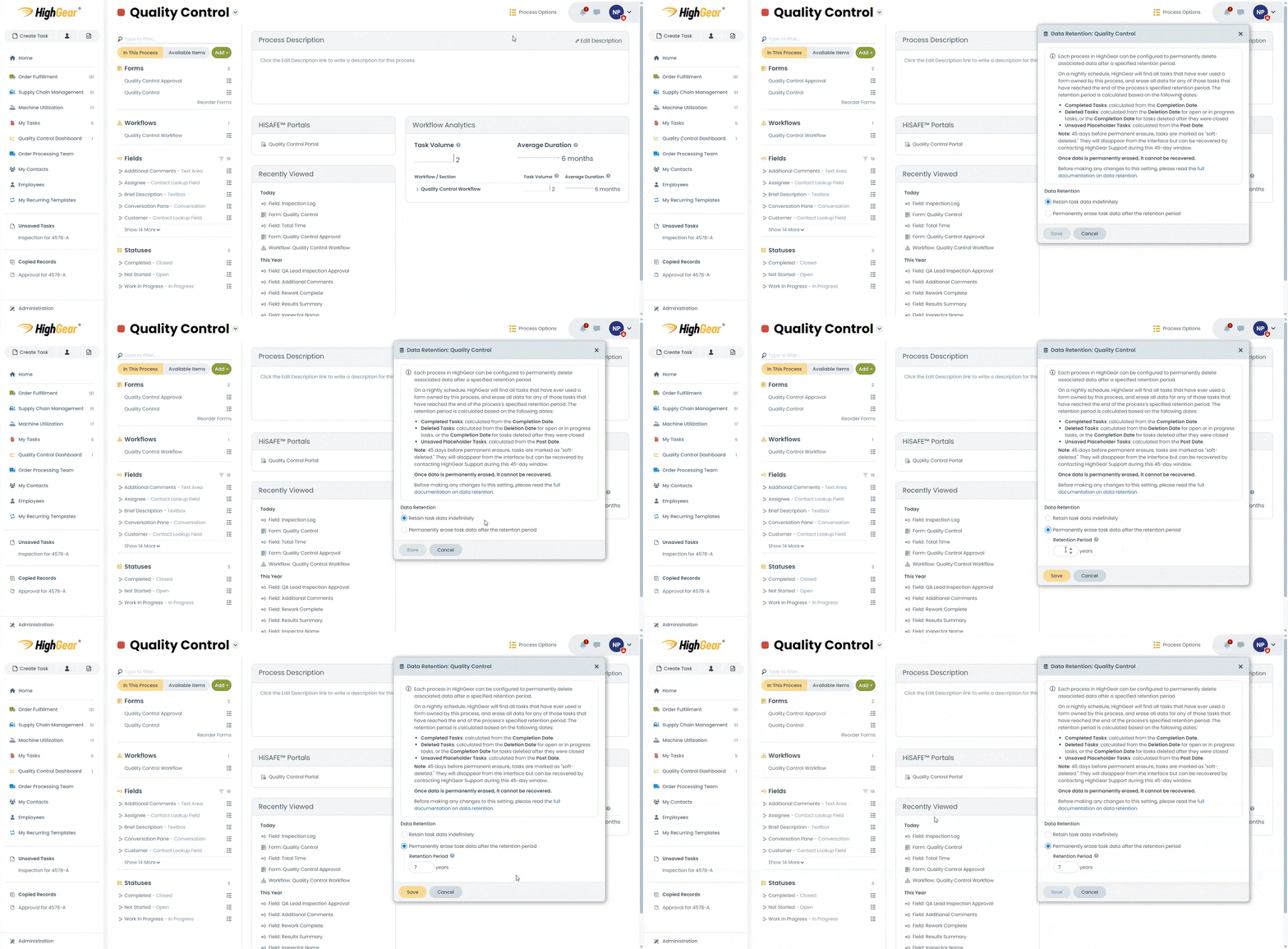
Each process can be assigned a specific retention period that determines how long associated task data should be preserved. Once a task reaches the end of that retention period, HighGear will automatically and permanently delete its stored data as part of a nightly cleanup process.
To support proper governance and help prevent misconfiguration, HighGear introduces a 45-day soft-deletion window. Tasks will disappear from the system 45 days prior to the permanent deletion date, giving administrators the time to recover incorrectly deleted data if necessary.
Administrators can manage retention settings from the Process Options > Data Retention menu on the process overview page. To ensure appropriate oversight, only admins with the new “Can Manage Data Retention” permission can change a process’s data retention policy.
Scheduled Configuration Sync
Configuration syncs can now be scheduled to run automatically at a specific date and time. This enhancement allows administrators to plan imports outside of peak business hours, reducing performance impacts and improving operational continuity.
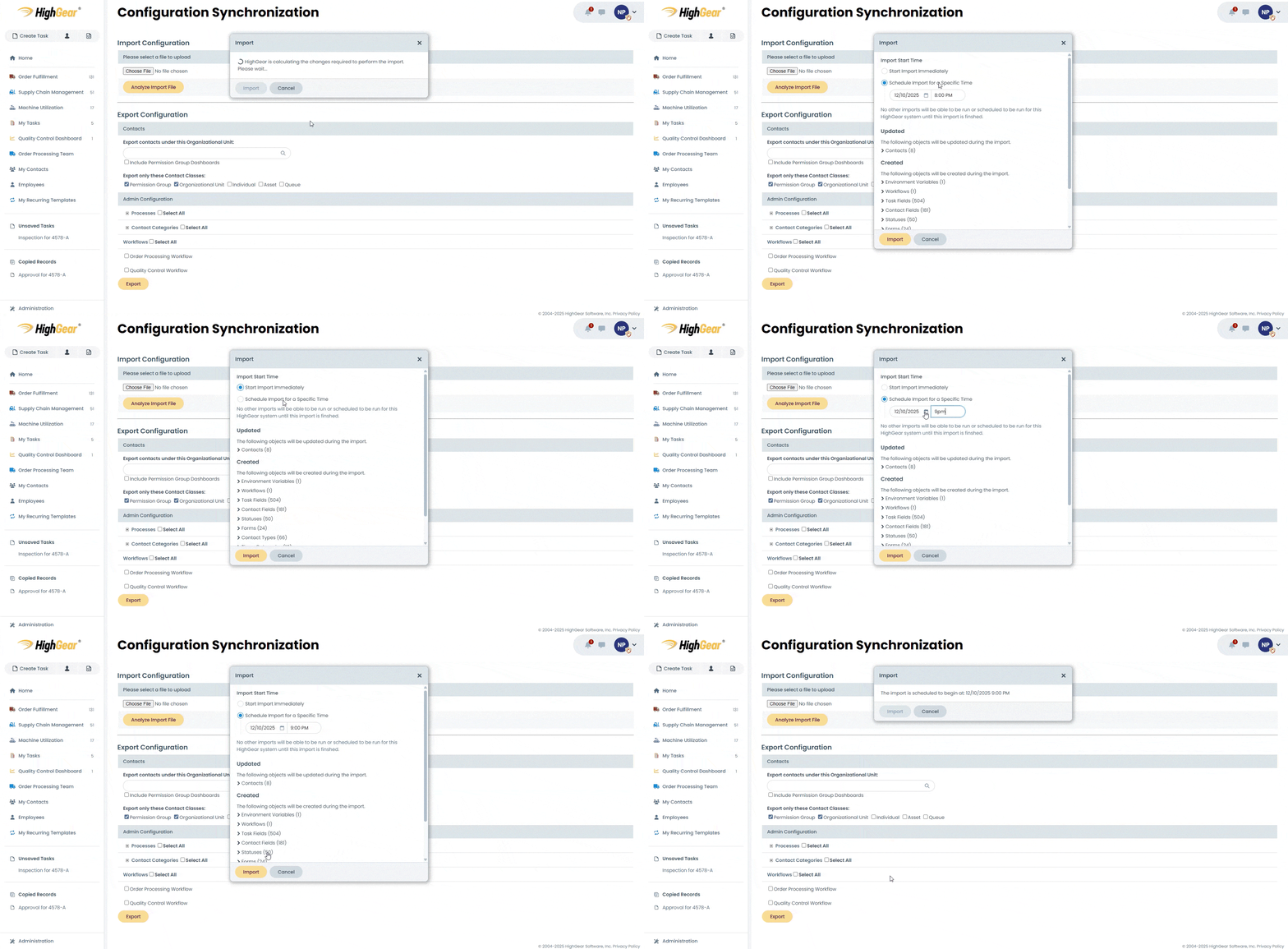
From the config sync page, administrators can:
- View upcoming scheduled imports
- Monitor the status of in-progress syncs
- Track progress throughout the import
This update offers greater control over how and when configuration changes are applied.
Configuration Sync Process Dialog Enhancement
A new enhancement provides real-time insight into what the system is doing. In addition to the original percentage indicator, the Config Sync progress dialog now displays a live text log showing exactly what is being done in the system. This detailed log appears whether a sync is scheduled, or started immediately.
New Date/Time Column Types for Table Fields
Table fields now support three new column types, expanding HighGear’s ability to capture and calculate time-based information:
- Date
- Time
- Date and Time
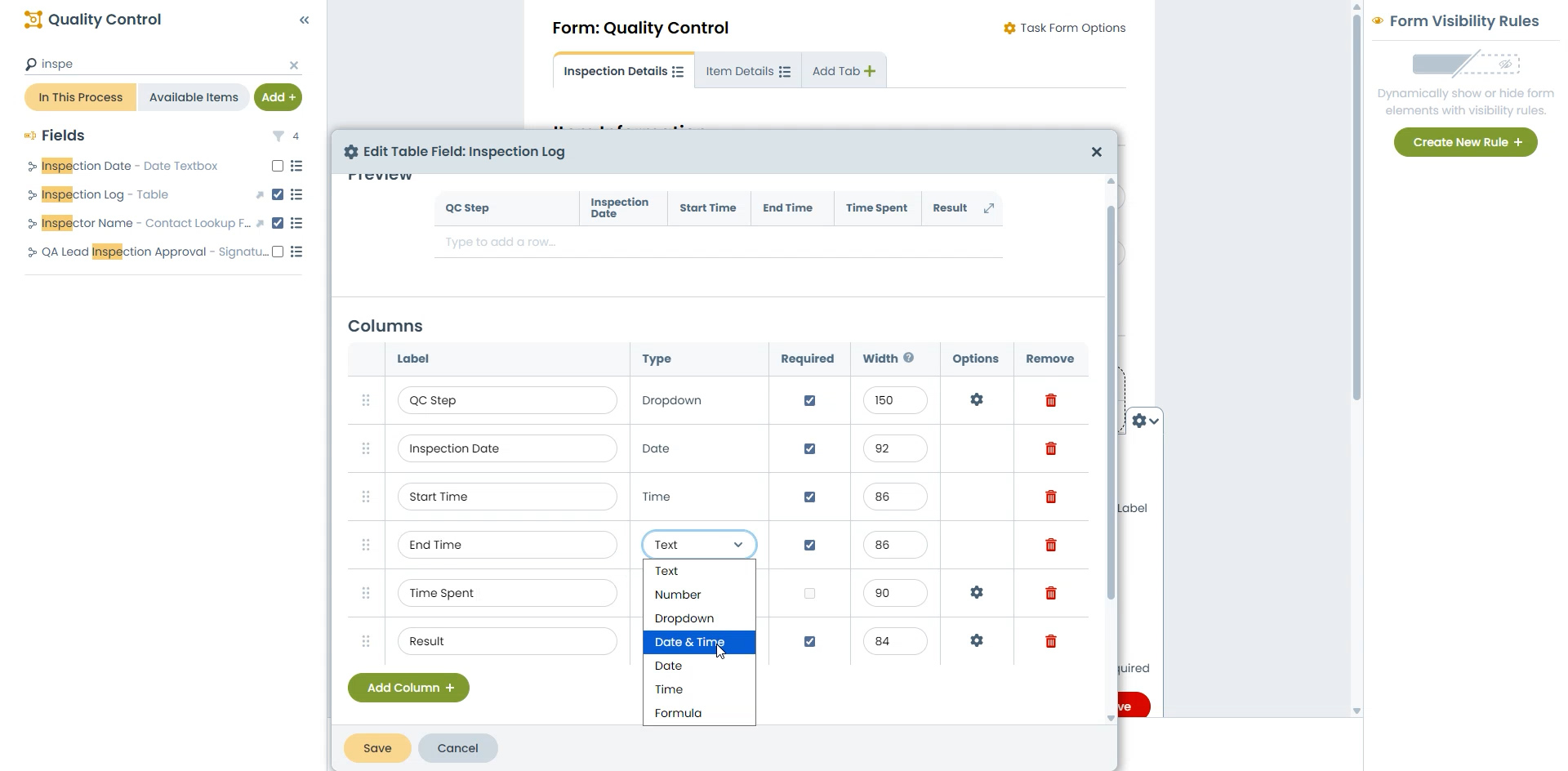
Formula columns have also been enhanced to compute differences between two date or time columns. This update enables more precise tracking, measurement, and reporting.
Example use cases:
- Capturing the dates and times for events
- Capturing a time log for work and tracking the total hours worked
Clickable Links in Display Text
HighGear now automatically converts URLs and email addresses within Display Text form elements into clickable links. This improvement makes it easier for users to access external resources, documentation, or contacts from the forms they interact with.
Rollup Features
HighGear 10.2.1
Table Fields
Table Fields give teams a structured way to capture and manage row-based data directly within a task, making them ideal for items like expense line items, managing parts lists, or tracking activity logs.
Administrators can configure columns using familiar field types such as text, numbers, currency, and dropdowns, making it easy to tailor tables to each process.
Numeric columns can calculate totals automatically, and all table data behaves like any other field in HighGear: it can power dashboards, reports, and workflow logic.
Enhancements:
Emailed Dashboards
Emailed dashboards now provide a fuller, more accurate view by mirroring your HighGear dashboard layout, including all columns, hierarchy, and grouping so you can get complete context right from your inbox.
You can choose how many rows to include, whether you need a quick snapshot or a detailed overview, and you can also configure dashboards to send emails only when there’s data to show, ensuring you receive updates that are timely and relevant.
Recurring Template Dashboards
The recurring template dashboard interface now allows you to find templates that are disabled, helping to reducing surprises and keep critical workflows on track.
Whether a template was disabled by the Disable Schedule button or automatically stopped after its end-of-recurrence condition was met (e.g., after five runs), users can quickly find it and understand why it stopped creating tasks, and at what date and time.
HighGear 10.2.2
Formula Columns for Table Fields
Administrators can now configure formulas inside a table field. This feature allows columns to automatically calculate and display results based on other columns, eliminating manual data calculation and ensuring consistency.
Improved Task Form Copying
Administrators now have greater control when copying task forms. A new option makes it simple to configure whether a copied form should be user-creatable from within the HighGear interface. This makes it easier to prevent unintentionally allowing users to create forms that were exclusively intended for automations or rule-based usage at later stages of workflow.