
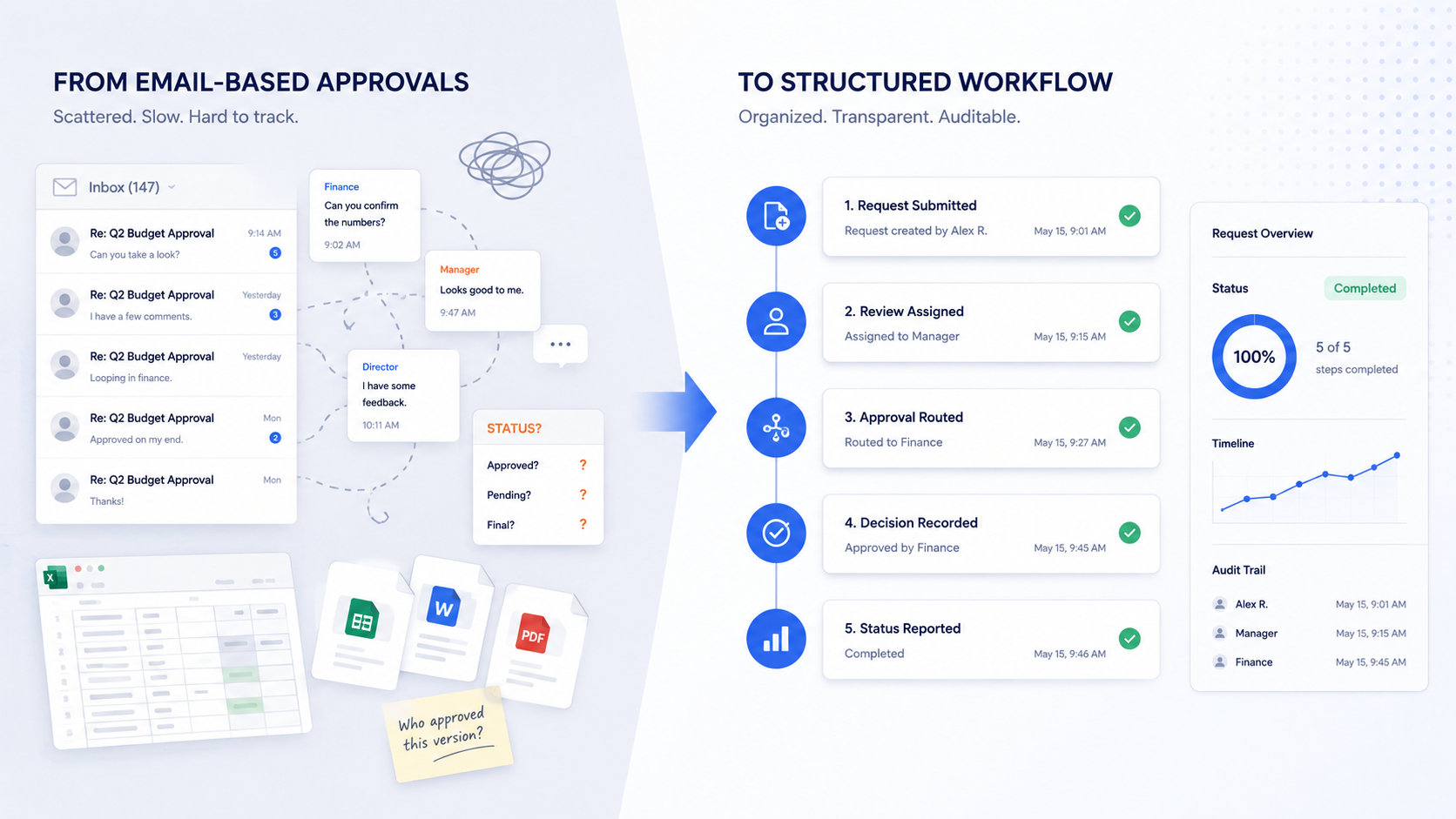
Email is a perfectly decent communication tool. It’s fast, familiar, and already sitting in everyone’s browser tab. So many approval processes end up living there because it’s just the path of least resistance.
The basic idea is sound: someone sends a request, a manager reviews it, people weigh in, someone approves, work moves forward. Simple enough. Except that’s rarely what actually happens.
Email wasn’t built to manage structured approval processes. It’s fine for discussion, but it struggles with the operational reality: who owns the next step, whether the right information was reviewed, what’s overdue, what decision was actually made, and what record exists once the thread goes cold.
For a one-off, low-stakes approval, that might be fine. But when approvals are recurring, cross-functional, deadline-sensitive, or tied to compliance requirements, an inbox starts to feel less like a system and more like a gamble.
A structured approval workflow gives every request a clear starting point, defined steps, assigned owners, required information, status visibility, and a reliable record of decisions without depending on any single person’s inbox management skills.
Why Teams Default to Email for Approvals
Nobody sits down and says, “Let’s build our compliance approval process around forwarded emails.” It just happens because email requires zero setup, no training, and no formal rollout. Someone needs a decision, so they send a message and wait.
For small teams or low-stakes decisions, that can genuinely work. Email makes sense when the approval is rare or one-time, only one person needs to sign off, there’s no documentation requirement, and nobody’s going to ask for a report on it six months from now.
There’s also the illusion of a paper trail. Threads have timestamps, replies, and attachments. If you need to check something later, you can search your inbox. That feels like a record until you actually need to reconstruct what happened and realize the relevant details are scattered across three threads, a forwarded message, and someone’s desktop folder.
Email works as a communication layer. The problem is treating it as the process layer.
Where Email-Based Approvals Break Down
These problems rarely announce themselves. The process feels manageable at first, but gradually the team adds more reviewers, more approval types, more documentation requirements, more exceptions, more deadlines. At some point, the inbox becomes the process map, the task list, the reminder system, the document trail, and the reporting tool. That’s a lot to ask from an inbox.
Approval requests go missing
When approval requests live alongside everything else in someone’s inbox, they get buried. A message sits under newer emails. A thread gets split when someone hits “reply all” instead of “reply.” Someone forwards the request to a third party, and now there are two parallel threads with no single owner. People start sending follow-up messages just to confirm whether the original message was seen which adds noise without adding clarity.
Ownership evaporates
Email threads are genuinely bad at answering the question: “What happens next, and who does it?” When a request goes to five people, it’s easy for each of them to assume someone else is handling it. One reviewer might approve their portion while another is still waiting for more information. Someone might be CCed “for awareness” and not realize they’re supposed to act. The more people involved, the harder it is to tell who’s in the driver’s seat and the more likely it is that nobody is.
Follow-up becomes someone’s second job
Email approvals usually require a dedicated human shepherd: a manager, coordinator, or whoever cares most about the outcome. That person sends reminders, digs through old threads, updates tracking spreadsheets, and pings people who’ve gone quiet. It’s invisible work, and it’s completely manual. If the process only functions because one person is constantly nudging it forward, the process is fragile in ways that only become obvious when that person is on vacation.
Decisions are hard to prove later
Email can show that a conversation happened. It’s much harder to use as evidence of what was actually decided. The relevant details end up scattered across threads, attachments, forwarded messages, chat side-conversations, and shared folders. For regulated work or anything subject to audit, that’s a real problem. Reconstructing approval history from an inbox archaeology project isn’t a compliance strategy, it’s a liability.
Reporting is effectively impossible
Leadership often wants to know things like: how many approvals are open, which ones are overdue, where they’re getting stuck, and how long the process typically takes. None of those questions are answerable from email without doing manual work. Teams compensate by building spreadsheets and holding status meetings, which temporarily solves the reporting problem by creating a second system that also has to be kept current by hand.
Consistency degrades over time
Email’s flexibility is a feature for communication and a bug for process management. When every approval is handled as a custom thread, different reviewers inevitably follow different steps. One team copies compliance; another doesn’t. One department saves supporting documents in a shared folder; another leaves everything in the thread. That inconsistency makes it hard to standardize, train, audit, or improve anything because there’s no single process to point to.
What a Structured Approval Workflow Actually Looks Like
A structured approval workflow turns the informal dance of emails and follow-ups into a defined sequence of steps. Instead of starting with a loose message, the process starts with a clear request form that captures what’s actually needed. Instead of relying on people to remember routing, the workflow sends the request to the right reviewer automatically. Instead of manual follow-up, the system tracks status and escalates on its own.
A well-designed approval workflow answers several questions that email leaves open: What triggers the process? What information is required before a reviewer can act? Who has authority to approve at each stage? What happens if a request is incomplete, overdue, or rejected? What documentation gets retained, and how is it reported on?
The specific steps vary by process (for instance, a contract review looks different from a safety exception request) but the principle is consistent: the approval is managed as structured work, not as a conversation that happens to have a decision buried somewhere in the middle.
Steps to Replace Email-Based Approvals
Replacing email-based approvals doesn’t mean redesigning every process at once. The most effective approach is to start with one workflow that’s visible, repeatable, and causing measurable friction, prove the model, then expand.
Step 1: Pick one process to fix first
Choose a workflow where the email problem is concrete: requests go missing, approvals are hard to track, documentation is scattered, or the process has compliance implications. Good candidates include contract reviews, compliance sign-offs, policy approvals, quality reviews, exception requests, and risk assessments.
Resist the temptation to start with the most complicated process in the organization. The right first workflow is one that happens regularly, involves multiple people or steps, and creates real pain when it’s delayed or poorly documented, but is still narrow enough to map without getting lost in edge cases.
Step 2: Map how the process actually works today
Before building anything new, document the current state of both the official process and the unofficial workarounds. The workarounds are often where the real process lives, quietly holding things together with spreadsheets and institutional memory.
Walk through the key questions: Who submits the request, and what do they send? Who reviews it first, and who has final authority? Who follows up when someone goes quiet? Where do documents actually end up? What causes delays, and what do the most common exceptions look like? This exercise tends to surface things that will need to be explicitly handled in the structured workflow.
Step 3: Define required information upfront
Many approval delays happen because the request is incomplete: the reviewer needs a document, a dollar amount, a risk rating, or a business justification before they can make a decision, and the back-and-forth to get it costs days. A structured workflow captures the required information at the point of submission.
The goal isn’t to collect everything imaginable, but to collect the right things early enough to prevent rework. That typically means request type, submitter and stakeholder details, supporting documents, relevant deadlines, risk level, financial impact if applicable, and any compliance or policy categories that affect routing.
Step 4: Assign ownership for every step
Every review, approval, escalation, and follow-up task should have a clearly identified owner. For each step, the workflow should answer: who is responsible, what action they need to take, when it is due, what happens after they complete it, and what happens if they do not.
Clear ownership is the antidote to approval purgatory; the state where everyone is copied but nobody is responsible, and the request quietly sits until someone eventually asks about it.
Step 5: Build reminders and escalation rules
Email-based processes tend to depend on one person manually reminding everyone else. A structured workflow should eliminate most of that burden. Define what triggers an automatic reminder, when an overdue approval escalates to a manager, how incomplete requests get returned to the submitter, and how stakeholders get notified when a final decision is made.
Reminders and escalations are about removing the single point of failure that exists whenever one person is doing all the shepherding by hand.
Step 6: Capture decisions in one place
One of the most significant weaknesses of email approvals is that the record is scattered by design. A structured workflow should capture everything in one place: who reviewed the request, who approved or rejected it, when, what information was available, what comments were added, what documents were attached, and what follow-up actions were created.
This matters beyond audit prep. It also means that six months from now, when someone asks “why did we approve this?” there’s actually a usable answer that doesn’t involve sifting through archived email threads.
Step 7: Report on workflow performance
Once the approval process is structured, you can measure it, which is something email genuinely cannot do. Useful metrics include open requests, overdue approvals, average cycle time, bottlenecks by workflow stage, workload by reviewer, exception volume, and approval and rejection trends.
This visibility shifts the conversation from “approvals feel slow” to “approvals are consistently getting stuck at the legal review step, and here’s the data.” That’s a conversation you can actually do something with.
Step 8: Iterate from there
The first version of a structured workflow doesn’t need to be perfect. It needs to be visible, usable, and better than the email process it replaces. Once it’s running, the data and user feedback will tell you what to fix: which steps take longest, which requests get returned most often, which reviewers are overloaded, which fields confuse submitters, and which manual follow-ups still exist despite your best efforts.
That kind of continuous improvement requires a structured process you can actually measure. Email rarely offers that, because the process is too fragmented to analyze cleanly.
What to Look for in Approval Workflow Software
If your team needs more control, visibility, and auditability, approval workflow software can replace the scattered email thread with a system built to handle the full lifecycle: intake, routing, tracking, decisions, and real-time reporting.
The core capabilities worth evaluating: configurable forms, flexible approval routing, role-based assignments, conditional logic, automated notifications and reminders, escalation rules, audit history, dashboards and reporting, document handling, permissions, no-code workflow configuration, and integration options.
The right system manages the process from request intake through final decision. Anything that only handles the notification layer (alerting someone that an approval is pending) is still leaving the real work to email.
For a broader breakdown of what these systems should include, see our guide to approval workflow software.
How HighGear Helps Teams Move Beyond Email-Based Approvals
HighGear helps teams turn email-based approval processes into structured workflows that are actually manageable using flexible workflow automation software. That means configurable forms for capturing requests, defined approval paths, ownership assigned to every step, routing based on process rules, real-time status visibility, and a full record of workflow activity.
HighGear is particularly well-suited to approval-heavy work that goes beyond a simple yes-or-no: recurring reviews, compliance workflows, policy and contract approvals, quality processes, risk assessments, technical reviews, and customer service workflows where accountability and documentation actually matter.
The result is an approval process that doesn’t depend on inbox archaeology, heroic follow-up habits, or one person holding all the institutional knowledge about where things stand.
Read Compliance Workflow Case Study
Email Still Plays a Role
Moving approvals into a structured workflow doesn’t mean banning email. It means clarifying what email is good for and what it isn’t.
Email is useful as a notification layer: alerting someone that work needs their attention, confirming that a decision has been made, or summarizing where things stand. That’s a perfectly reasonable job for an inbox. What shouldn’t live there is the request itself, the approval record, the ownership structure, the status, the documentation, or the reporting.
Email is the notification layer. The workflow system is the process layer. Once teams make that distinction clearly, they can keep the convenience of email without asking it to do work it was never designed for.
Final Takeaway
Email-based approvals are common because they’re easy to start. But the costs accumulate: lost requests, unclear ownership, manual follow-up, incomplete records, unreliable reporting, and processes that only hold together because one person is constantly holding them together.
A structured approval workflow replaces that with something repeatable. It defines how requests are submitted, what information is required, who reviews and approves the work, what happens at each stage, and how decisions are recorded, so the process doesn’t depend on institutional memory, inbox hygiene, or someone reliably remembering to follow up.
If your team is currently managing approvals through a combination of inboxes, manual reminders, tracking spreadsheets, and scattered attachments, the process is the problem. A structured workflow gives you something better to replace it with.
FAQs
Why is email a poor tool for managing approvals?
Email is built for communication, not workflow management. It doesn’t provide reliable routing, status visibility, clear ownership, automatic reminders, reporting, or audit history. As approval processes grow more complex, those gaps become real operational problems.
When should a team replace email-based approvals?
When requests are frequently delayed, hard to track, difficult to report on, or risky to audit, particularly when they involve multiple reviewers, recurring steps, formal documentation requirements, or compliance obligations.
What is a structured approval workflow?
A defined process that specifies how a request is submitted, what information is required, who reviews it, who approves or rejects it, what happens at each stage, and how the decision is recorded. The goal is to make the process repeatable and transparent, not just possible.
Can structured approval workflows still use email notifications?
Yes, and they should. Email is fine for alerting someone that work needs attention. The distinction is that the approval record, ownership, status, and reporting should live in the workflow system, not in the inbox.
What software replaces email-based approvals?
Approval workflow software routes requests through defined steps, assigns ownership, tracks status, automates reminders, and maintains a record of approval activity. Look for systems that handle the full process, not just the notification.
How do you get started with structured approvals?
Start with one repeatable approval process that’s causing clear friction. Map how it actually works today, define the required information, assign owners to every step, decide what needs to be recorded, configure the workflow, and expand from there once it’s running.