
HighGear 10.3.1 introduces the new HighGear Agentic AI Workflow Node, expanding workflow automation with autonomous, action-oriented AI.
This release represents the first phase of HighGear’s broader agentic AI strategy, moving AI beyond chat-based interactions and into structured, action-oriented workflow automation.
In addition, we’ve enhanced the performance of dashboards and lists and added a new “Forgot Username or Password” feature to HiSAFE to improve secure account recovery.
- SaaS customers will be upgraded to version 10.3.1 on the following dates:
- Early Access: Saturday, February 21st
- Mainstream: Saturday, February 28th
- For support, please contact Support@HighGear.com.
- For additional licenses or services, please contact Sales@HighGear.com.
New Features
HighGear Agentic AI Workflow Node
HighGear now offers configurable, process-level data retention to help organizations strengthen compliance, reduce unnecessary data storage, and maintain audit-ready governance.
The HighGear Agentic AI Workflow Node is a new workflow node type that allows administrators to configure an autonomous AI agent to evaluate and act on tasks as they move through a workflow.
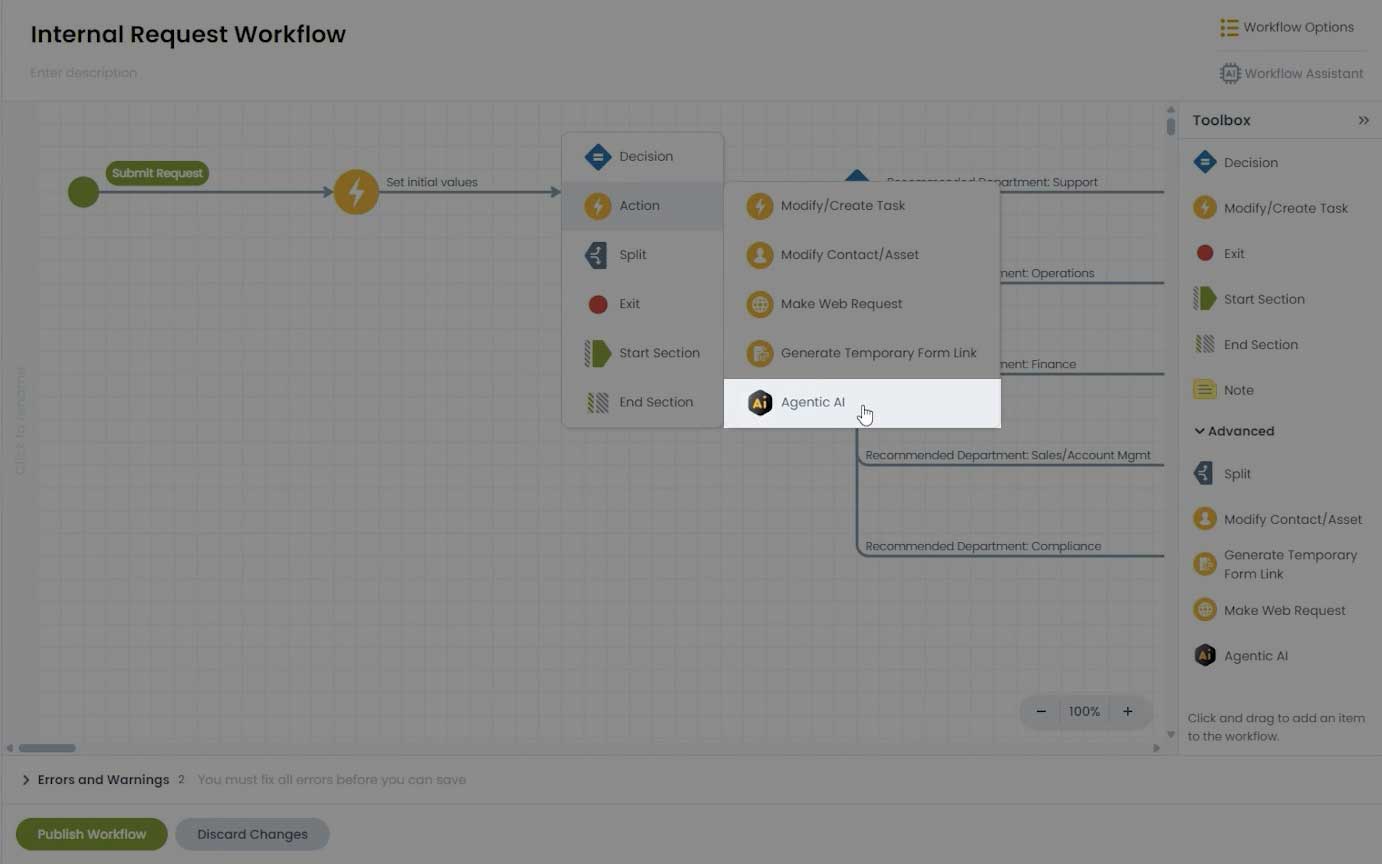
Unlike session-based chat tools, this node operates independently within the workflow, executing actions based on predefined instructions and selected data fields. All actions are performed within administrator-defined parameters and configured workflow logic.
This feature allows organizations to:
- Reduce manual review steps
- Automate decision support
- Standardize complex evaluations
- Extend workflows with intelligent, configurable logic
How It Works
When configuring the node, an administrator defines:
- Instructions/Prompt that tells the AI agent how to evaluate or process task data
- Data fields that are sent to the agent
- A short description for each field to provide context
- Result fields where the agent stores its results
Most field types are supported.
When a task reaches the node:
- HighGear sends the configured instructions and selected data to the AI agent
- The agent evaluates the task
- Results are returned to HighGear and stored in the configured result fields
Example Use Case
Organizations can configure the Agentic AI Workflow Node to perform recurring task health evaluations.
For example, a job task can route to an AI Agent on a scheduled cadence (daily, weekly, or custom intervals). The agent reviews the task data, such as parts availability, progress completed, time logged, due dates, etc., to detect potential blockers or risks.
If a blocker is identified, the agent can classify the issue, recommend follow-up actions like escalation, assess potential due date impact, and more.
If no blocker is detected, the agent records a brief status summary and continues the workflow.
This enables proactive risk detection and intelligent workflow adaptation without manual monitoring.
Security Considerations
Workflow Agentic AI nodes are designed with enterprise governance and compliance in mind:
- Explicit Data Boundaries: Administrators must select exactly which fields are sent to the agent. Only those fields are shared.
- New Permission: A new Can Manage Agentic AI Workflow Nodes administrator action permission controls who can configure and manage Agentic AI nodes.
- Permission Upgrade Handling: Any Permission Group or user with the existing Can Manage Workflow permission will automatically receive the new Can Manage Agentic AI Workflow Nodes permission upon upgrade.
- System-Level Control: A new Allow Agentic AI Nodes in Workflow system setting allows this feature to be enabled or disabled globally.
New Action Permissions
The new Can Manage Shared Dashboards permission can be granted to users who should be able to manage dashboards shared to permission groups without having to also grant Can Manage User Accounts and Security permission.
Three new administrator action permissions allow more granular control over whether administrators can delete important system objects:
- Can Delete Task Fields
- Can Delete Contact Fields
- Can Delete Workflows
Performance Improvements
- Significantly reduced loading times when working with very large forms in the form designer.
- Significantly reduced loading times when scrolling through long dashboard lists.
HiSAFE Changes
- Added “Forgot Username or Password” button to all HiSAFE features, allowing users to recover their username or reset their password.