
HighGear 10.3.2 introduces powerful new formula capabilities along with enhancements to the form designer and performance improvements that make managing complex workflows faster, more flexible, and easier to maintain.
This release continues our focus on giving administrators more control while reducing the need for manual workflow logic.
Release Schedule
SaaS customers will be upgraded to version 10.3.2 on the following dates:
- Early Access: Saturday, April 18th
- Mainstream: Saturday, April 25th
- Self-hosted customers will receive these features in the next rollup release
For support, please contact Support@HighGear.com.
For additional licenses or services, please contact Sales@HighGear.com.
New Features
Formula Fields
HighGear now supports formula fields, allowing administrators to calculate and display real-time values directly within forms, lists, and dashboards.
Unlike workflow-based formulas, formula fields are evaluated at the time of display. This removes the need to build and maintain workflow logic to keep values up to date.
Key advantages:
- Real-time calculation: Values update instantly as users interact with referenced fields.
- No workflow dependency: Eliminates the need for workflow logic to monitor and recalculate values.
- Immediate availability: Add or modify formulas at any time. Formulas will immediately be calculated for all existing records.
- Dynamic context: Functions like $Logged-In User$ and Now adjust based on the viewer and time.
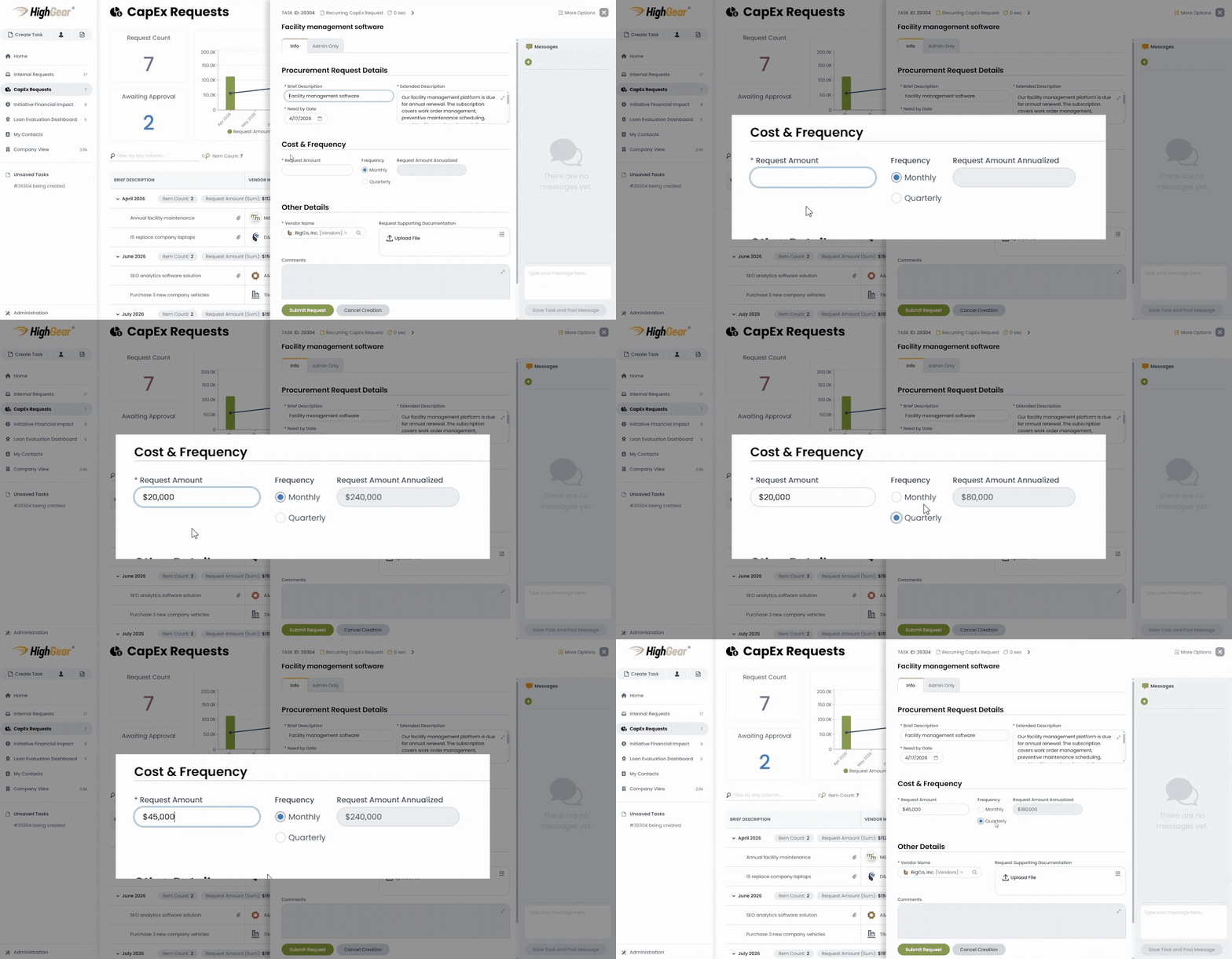 Formula fields real-time calculation
Example use cases:
- Calculate values in real time and drive dynamic form behavior:
$Item Cost$ * $Item Quantity$
→ Calculates and updates instantly as users enter values on a task form
→ Can also power visibility rules to display warnings when thresholds are exceeded
- Highlight aging work in dashboards:
Round(DateDiff(Days, $Post Date$, Now))
→ Add as a dashboard column to show how long each task has been active
- Personalize team dashboards with conditional formatting:
ListContains($Assignee$, $Logged-In User$)
The value for the formula will be “Yes” if the logged-in user is assigned to the task.
→ Can be used in a conditional formatting rule to highlight records assigned to the current user.
Formula fields can also power visibility rules, enabling dynamic behaviors such as displaying warnings when thresholds are exceeded.
Form Designer Enhancements
This release introduces several improvements that make it easier to design, manage, and maintain complex forms.
New capabilities include:
- Define multiple criteria within a single visibility rule
- Duplicate visibility rules to accelerate configuration
- Automatically filter visibility rules based on selected form elements
- Prevent accidental deletion with a new warning when dragging display text
A new option also allows administrators to reset hidden field values to their form defaults when visibility rules hide them.
These enhancements reduce configuration effort while improving form reliability and data consistency.
Performance Improvements
Faster Configuration Sync Imports
Configuration sync imports involving a large number of fields now run significantly faster, allowing administrators to deploy changes more efficiently and with less disruption.